
Pandas UDF for PySpark
I came across pyspark Pandas UDF when I was trying to rewrite my python code for pyspark for scaling purpose. I would like to perform a train test split within each user group, but there’s no easy way to do that in pyspark due to the way the groups, rows and columns are presented in spark. Luckily, Pandas UDF came to my rescue. I found it a very powerful tool and I’d like to share it in this post.
Introduction
Pandas UDF was a new funtion introduced in version 2.3 and it is still “Experimental” according to the API documentation. It is built on top of Apache Arrow and it creates vectorized user definded function (UDF).
Why Pandas UDF?
PySpark has an existing UDF which was introduced in version 1.3, so why use Pandas UDF? Compared to the existing UDF, Pandas UDF has the following advantages:
- Better Performance
The existing UDF operates one-row-at-a-time, while Pandas UDF takes advantage of vectorization. - Ressemblance of Pandas DataFrame
Unlike the existing UDF which takes a python object, Pandas UDF can takepandas.Seriesorpandas.DataFrameand input and return apandas.Seriesorpandas.DataFrame. This allows you to code like you were working with a pandas dataframe and you don’t have to worry about how to operate Spark Row and Column objects.
Let’s walk through a few examples to see how it works:
First make sure that pyspark works properly and pyarrow is installed. To install pyarrow, you can either use conda:
conda install -c conda-forge pyarrow
or pip:
pip install pyarrow
There are two types of Pandas UDF functions: Scalar and Grouped Map. (Spark 2.4.0 introduced a third type: Grouped Aggregate which returns aggregated result. You can check the documentation for more information.)
Scalar
Scalar Pandas UDF works on columns. When you define the python function, the input should be a pandas.Series and the output is a pandas.Series with the same length.
To use it with spark Dataframe, we use pandas_udf as the function decorator. The decorator takes two arguments: the returnType and the functionType.
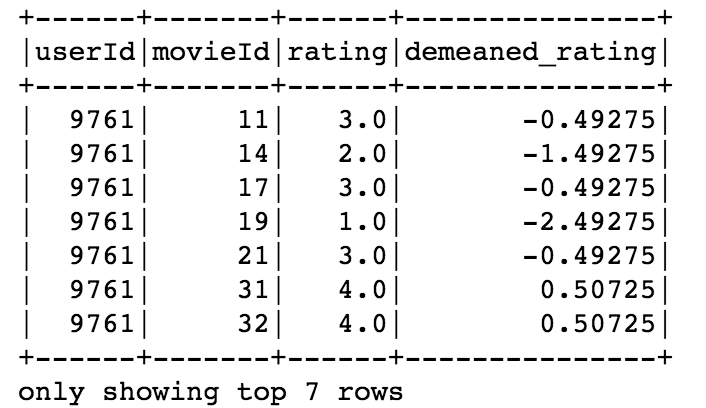
In this example, I have a spark dataframe df of movie ratings and I want to demean the ratings. The data type of the demeaned rating should be double and the functionType should be PandasUDFType.SCALAR since we are using the scalar Pandas UDF. Here’s how we define the function:
@pandas_udf('double', PandasUDFType.SCALAR)
def demean(rating):
    return rating - rating.mean()
We can use the Pandas UDF demean with withColumn to add a new column of demeaned_rating:
df_demean = df.withColumn('demeaned_rating', demean('rating'))
And here’s the result:
Grouped Map
You might not be convinced about the power of Pandas UDF yet, but the grouped map may change your mind.
Grouped Map Pandas UDF uses the same pandas_udf decorator, but in the returnType you need to pass a schema of the output dataframe and set the fucntionType to PandasUDFType.GROUPED_MAP. The dataframe schema could be a pyspark.sql.types.StructType or simply a string that specifies the column names and data type, separated by commas.
The input and output of the python function under the decorators should be grouped pandas.DataFrame. When we use it in combination with groupBy and apply, it works very similar as the split-apply-combine that we are familiar with.
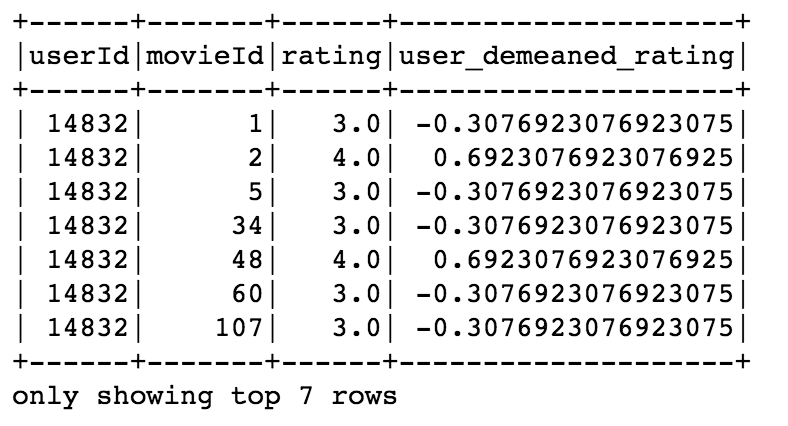
Let’s look at an example. This time I would like to demean the movie ratings within each user. First, define the output dataframe schma. Note that we need include the new demeaned column and its type.
demean_schema = 'userId int, movieId int, rating double, user_demeaned_rating double'
Define the function:
@pandas_udf(demean_schema, PandasUDFType.GROUPED_MAP)
def demean_user(df):
    df['user_demeaned_rating'] = df['rating'] - df['rating'].mean()
    return df
Apply the function with groupBy:
df_user_demean = df.groupBy('userId').apply(demean_user)
Here’s the result:
More Grouped Map Example
If you are still not impressed, let’s take a look at an example with a more complex function. In this example, I would like to make a holdout set from the rating data. I’d like to randomly choose half of users and if the chosen user has more than 25 ratings, I will randomly take 10 ratings to the holdout set. To aid the data split, I will first create a new column istest which labels whether the data belongs to holdout set.
Here’s the code:
istest_schema = 'userId int, movieId int, rating double, istest int'
TEST_MOVIES=10

#define pands udf
@pandas_udf(istest_schema, PandasUDFType.GROUPED_MAP)
def istest(df):
    # assign a random number and only pick ratings if it is > 0.5
    is_test_user = np.random.random()
    new_test = np.zeros(len(df))
    if is_test_user > 0.5 and len(df)> 25:
        test_ind = np.random.choice(np.arange(len(df)), TEST_MOVIES, replace=False)
        # change chosen ratings label to 1
        new_test[test_ind]=1
    # add 'istest' column to the df
    df['istest'] = new_test
    return df

# apply pandas udf
# as the function is nondeterministic, use cache to preserve the result
df_with_ind = df.groupBy('userId').apply(istest).cache()

# split dataset according to the 'istest' column
train = df_with_ind.filter('istest=0')
test = df_with_ind.filter('istest=1')
Note that inside the function, the code is written in the same way as if you write a function that works with a pandas dataframe.
All the codes are avaialbe at my Github Repo. I hope you find this post helpful!